
AI Agents Explained: Can a Chatbot Really Do Your Job While You Sleep?
AI agents are being promoted as digital workers that can handle your inbox, research, bookings, and reports while you rest. Some of that is already real. Much of it is still marketing. The gap between the demo and the daily reality is where freelancers, remote workers, and small business owners can lose time and money. This guide separates what AI agents do well today from what they cannot yet do, using recent 2026 reporting and official guidance, so you can decide where they fit in your work.
What Are AI Agents?

An AI agent is a software system that takes a goal, breaks it into steps, uses tools to act, checks the result, and continues until the task is done or it needs help. A regular chatbot answers a question. An agent tries to finish a job.
The difference usually comes down to four parts:
- A language model that reads instructions and reasons about what to do next.
- Tools such as email, spreadsheets, web search, calendars, code runners, or payment systems.
- Memory or context, which lets it keep track of progress across steps.
- Guardrails, which define what it may do without approval.
A Fortune analysis from early 2026 summed up the current state well: AI agents can do more than most people let them, but less than the hype suggests. They work best on tasks that are low-risk, loosely defined, and cheap to get wrong. A report that a human checks before sending is a good example. A payment that cannot be reversed is not.
Industry researchers describe the shift as moving from systems that answer questions to systems that perform tasks. That shift is real, but it does not mean an agent understands your job the way you do.
How an AI Agent Works in Practice
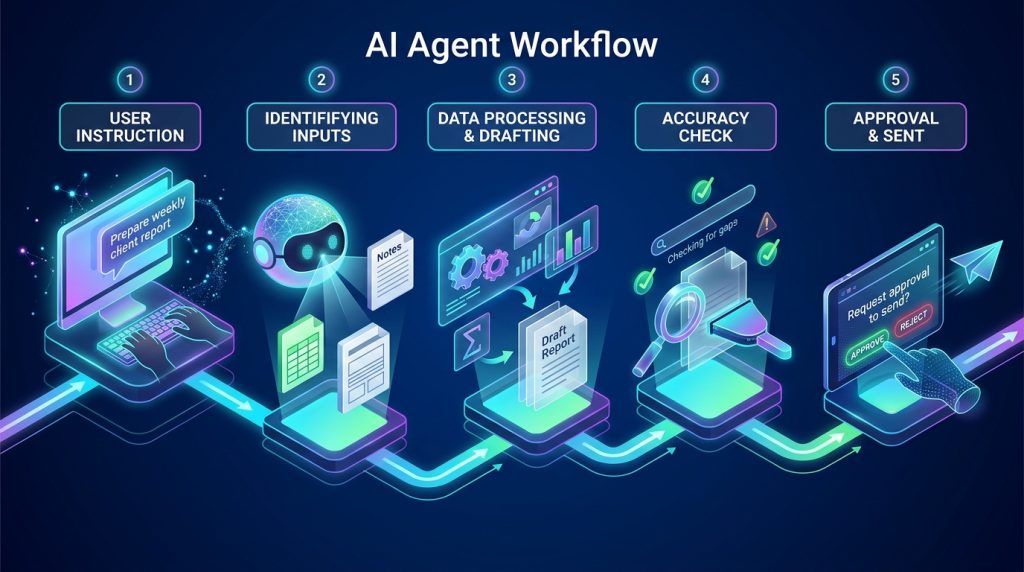
Here is a simple example. Suppose you ask an agent to prepare a weekly client report.
- It reads your instruction and identifies the inputs: a spreadsheet, last week’s notes, and a template.
- It pulls the data, calculates totals, and drafts summaries.
- It checks whether any numbers are missing or inconsistent.
- It saves a draft and asks you to approve before sending.
Each step depends on the one before. If the spreadsheet format changes, the agent may fail or, worse, produce a confident but wrong report. This is why agents need clear inputs and clear checkpoints.
Can an AI Agent Really Work While You Sleep?

For narrow, repeatable work with clear rules, yes, an agent can run unattended for hours. Examples include:
- Sorting incoming support tickets and answering common questions.
- Monitoring a website for broken links and drafting fixes.
- Collecting prices or competitor updates into a spreadsheet.
- Scheduling routine posts from an approved content calendar.
For broad, judgment-heavy work, the answer is not yet. Most professional roles involve context that is hard to write down: unspoken client preferences, shifting priorities, and decisions that carry reputational risk. Aaron Levie, CEO of Box, has argued that the definition of what an agent can do is not the same as the definition of a job. An agent can automate a task inside a job without automating the whole job.
Enterprise deployments in 2026 reflect this pattern. IT service vendors are rolling out agents that handle self-service requests and knowledge-base searches, with human escalation for complex cases. Coinbase has introduced tools that let AI agents execute defined trades and payments within user-set limits. In both cases, the agent operates inside boundaries that humans designed.
What Are the Real Risks?

Autonomy creates new failure modes:
- Errors compound. One wrong assumption in step two can ruin steps three through ten.
- Access creates exposure. An agent with access to your email or bank account can cause damage quickly.
- Costs add up. Prices for AI models have fallen, but long-running tasks that use many agents can still be expensive.
- Oversight becomes hard. Teams sometimes deploy agents without knowing who approved them or what data they can see.
The US National Institute of Standards and Technology (NIST) publishes the AI Risk Management Framework, a voluntary guide for managing risks across the AI lifecycle. It emphasizes mapping risks, measuring them, and managing them with human accountability. Even if you are a solo freelancer, its core idea applies: define what the system is allowed to do, watch what it does, and keep a way to stop it.
Steps to Evaluate AI Agents for Your Work
Use this process before handing any task to an agent.
Step 1: List your repeatable tasks

Write down every task you do weekly. Mark the ones that follow the same steps each time.
Example: A remote bookkeeper might list invoice reminders, expense categorization, and monthly summary drafts as repeatable. Client advisory calls are not.
Why it matters: Agents succeed on predictable work. Unpredictable work produces unpredictable results.
Step 2: Rate each task for risk

Score each task from low to high risk. Consider money, legal exposure, client relationships, and privacy.
Example: Drafting a social media post for your own review is low risk. Sending a payment to a supplier is high risk.
Why it matters: High-risk tasks need human approval at every consequential step.
Step 3: Start with a human checkpoint

Run the agent on one low-risk task and review every output for a week. Keep a simple log of errors.
Example: A digital marketer tests an agent that drafts Pinterest pin descriptions. They approve each draft before publishing and note which ones need edits.
Why it matters: Your error log tells you how much supervision the task actually needs.
Step 4: Limit permissions

Give the agent access only to the accounts and files required for the task. Use separate accounts where possible, and avoid storing passwords directly in prompts.
Example: A content writer gives an agent read access to one Google Drive folder, not their entire drive.
Why it matters: Least-privilege access limits the damage when something goes wrong.
Step 5: Measure time saved and errors caught

After two to four weeks, compare the time spent with and without the agent, and count how many errors reached you versus how many were caught.
Why it matters: Time saved must exceed time spent reviewing and fixing. Many people discover the savings are smaller than the demo suggested.
Common Mistakes to Avoid
Mistake 1: Expecting a full job replacement. Agents handle parts of tasks, not whole roles.
Solution: Automate one step at a time and measure each.
Mistake 2: Skipping the approval step. Removing human review to “save time” often causes the costliest errors.
Solution: Keep approval on anything that sends, pays, publishes, or deletes.
Mistake 3: Giving broad access. Connecting an agent to every app you use creates a large attack surface.
Solution: Grant access task by task and revoke it when the project ends.
Mistake 4: Trusting confident output. Agents can sound certain while being wrong.
Solution: Verify facts, figures, and links before they reach a client or audience.
Mistake 5: Ignoring data privacy. Client files and personal information may be processed by third-party services.
Solution: Read the provider’s data policy, and do not upload confidential material to tools you have not vetted.
Useful Tips for Beginners
- Start with a single, boring task. Choose something you already do well and can check quickly.
- Write clear instructions. Specify the input, the output format, the steps, and what to do when information is missing.
- Ask for a plan before action. Requesting a step-by-step plan first makes errors easier to spot.
- Keep a stop button. Know how to pause or revoke access to every connected tool.
- Build from the foundation up. Just as technical SEO must work before advanced optimization, reliable inputs and simple workflows must work before you add autonomy. Skipping this layer makes every later step harder.
- Think about income carefully. Agents can reduce admin time, but they do not guarantee clients, sales, or passive income. Treat any automation as a productivity tool, not a promise.
Frequently Asked Questions
Can an AI agent replace a freelancer or employee?
Not in full. Agents can take over specific, repetitive steps, but clients and employers still need judgment, accountability, and relationship management. Current evidence points to changing job shapes rather than complete replacement, though outcomes vary widely by industry and role.
Is it safe to give an AI agent access to my email?
It can be, with limits. Use a separate account where possible, grant read-only access first, require approval before sending, and review the provider’s security and privacy documentation.
How much do AI agents cost?
Pricing varies by platform, model, and usage. Many tools offer free tiers, but heavy or long-running tasks can cost more. Check current pricing on the official provider site before committing, because rates change frequently.
What is the best first use of an AI agent?
Research summaries, draft generation, data collection, and routine formatting are common starting points. Choose tasks where a mistake is easy to catch.
Do I need coding skills to use AI agents?
Not always. Many consumer and business tools offer no-code setup. Technical skills help with custom integrations, error handling, and security configuration.
Final Thoughts
AI agents can do real work while you are away, but only within clear limits. They succeed on narrow, repeatable tasks with strong guardrails and fail on messy, high-stakes work that depends on context. The practical path is to list your repeatable tasks, rate their risk, start small with human checkpoints, restrict access, and measure the results honestly. Your next step is simple: write down three tasks you repeat every week and decide which one is safe enough to test this month.

Sources and verification: Information in this article draws on 2026 reporting including Fortune’s February 2026 coverage of always-on AI agents, Khaleej Times’ June 2026 explainer on agentic AI, Cointelegraph’s June 2026 report on Coinbase’s agent tools, and the NIST AI Risk Management Framework. Adoption figures and vendor statistics found in marketing content were treated as unverified and are not presented as facts here.|
practical AI and productivity guides”, linking to www.digitaltaskcompass.com. Place it in the paragraph about evaluating tasks: “For more beginner-friendly tool walkthroughs, browse our older practical AI and productivity guides.