Critical PHP Vulnerabilities in 2026: Lessons for Secure Software Development in 2027
A tech specialist’s evidence-based briefing for freelancers, developers, and site owners. Facts checked October 31, 2026.
On October 21, 2026, the PHP project shipped emergency patches for two flaws that let an unauthenticated attacker run code on a server. Palo Alto Networks’ Unit 42 reported telemetry showing more than 22.6 million internet-exposed instances potentially vulnerable. If you build, host, or manage websites, these critical PHP vulnerabilities are not someone else’s problem.
This guide explains what happened, what is confirmed and what is still disputed, and how to secure your setup step by step. I cite sources, flag estimates, and promise nothing I cannot verify. The story is still moving, so re-check the advisories before you act.
What Are Critical PHP Vulnerabilities?

Critical PHP vulnerabilities are flaws in PHP itself, or in code running on it, that can let an attacker take over a server with little or no authentication. Severity is scored with CVSS, where 9.0 to 10.0 counts as critical. Both flaws in this story scored 9.2 on CVSS 4.0.
Two ideas matter. First, the bugs live in the PHP runtime, the engine that executes your code, not in your WordPress theme or Laravel app. Second, remote code execution (RCE) means an attacker may run commands as the web server user. That is a starting point rather than automatic total ownership, which is why Step 4 below limits what that user can reach.
What Happened: The PHP2Shell Timeline
The pair is nicknamed PHP2Shell. Here is the sequence as reported by the PHP project, Unit 42, and the security press.
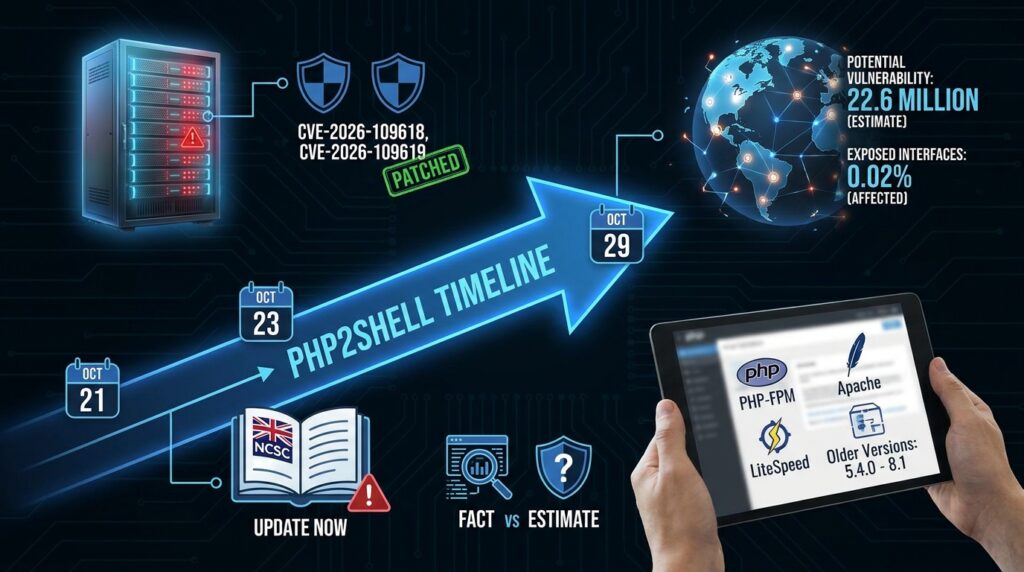
- October 21: PHP released 8.5.12, 8.4.27, 8.3.36, and 8.2.35, as described in PHP’s official security advisory. They fix CVE-2026-109618 (memory corruption when PHP handles out-of-memory errors) and CVE-2026-109619 (stale global state after a fatal error). BleepingComputer reports the flaws were found by researchers at Calif, Wiz, and OpenAI.
- Who is exposed: The advisory lists PHP-FPM, Apache with mod_php, php-cgi, FrankenPHP, and LiteSpeed. Risk is highest on mod_php, where researchers demonstrated that an unauthenticated request can trigger the attack before any application code runs.
- Older versions: Upstream no longer supports PHP 8.1 and older, though PHP’s security team offered minimal source backports for 7.4, 8.0, and 8.1. Kaspersky notes unofficial reports that versions back to 5.4.0 are affected. Treat that as unconfirmed.
- Official warnings: The UK National Cyber Security Centre urged organizations to update PHP systems or take them offline until patched.
- October 23: PHP disclosed a third, narrower flaw, CVE-2026-115560, which needs unusual session settings. It said it would publish a full advisory with the next regular release.
- October 29: Palo Alto Networks reported active exploitation against PAN-OS management interfaces exposed to the internet. Dream Research reported a campaign that chained PHP2Shell with a Linux kernel privilege-escalation flaw to gain root on 25 servers, and Unit 42 independently verified the attacker’s tooling. Palo Alto says about 0.02% of its installed base had such exposed interfaces and was affected.
Fact versus estimate: The 22.6 million figure is Unit 42’s estimate of potentially vulnerable instances, not confirmed compromises. At disclosure, the PHP Foundation said it had no evidence of exploitation before disclosure or on patched systems. Unit 42 also retracted an October 23 claim about a government-agency attack after it could not tie that intrusion to these CVEs. The lesson: early attribution is unreliable, so follow primary advisories and their update notes.
Why Critical PHP Vulnerabilities Matter to Freelancers and Small Sites

PHP runs a very large share of the web. Cybernews describes it as the code behind about two-thirds of the internet, a figure to treat as approximate. WordPress, Laravel, and countless client sites depend on it.
Three groups face different problems:
- Shared hosting clients: Your host controls the runtime. Ask for written confirmation of the patched version.
- VPS and cloud owners: Nobody patches for you. You own the runtime.
- Freelancers managing client sites: You may be blamed for a breach, so patching belongs in your maintenance scope. Our guide to freelance contract clauses shows how to write that down.
One point trips up many people. Updating WordPress or Laravel does not update the PHP runtime underneath it. That comes from your server package, your host, or your container image.
How to Secure Your PHP Setup: Step by Step
Step 1: Find Out What PHP You Actually Run
- What to do: Record the PHP version and server type for every site you manage.
- How to do it: On a server you control, run
php -v, then confirm the version that serves web requests, because the command-line PHP can differ from the one behind your site. On shared hosting, check the control panel or ask support. - Why it matters: You cannot patch what you have not inventoried.
- Example: A freelancer with 12 client sites finds three on PHP 8.1 and two on 8.2. Those five go first.
Step 2: Patch the Runtime That Serves Web Requests

- What to do: Move to 8.5.12, 8.4.27, 8.3.36, or 8.2.35, or your distribution’s equivalent fix.
- How to do it: Use your package manager, your host’s update tool, or a rebuilt container image. Then restart PHP-FPM or the web server so workers load the corrected code, as Kaspersky advises.
- Why it matters: PHP core developer Gina Peter Banyard said official patches are the only permanent defense. Do not judge by the version string alone, because distributions backport fixes.
- Example: A Debian server may keep an older version number with the fix included. Read the package changelog for the CVE.
Step 3: Use Stopgaps Only as a Bridge

- What to do: If you cannot patch today, apply partial mitigations and set a deadline.
- How to do it: Set
session.upload_progress.enabled=0in php.ini, your FPM pool, or server config (not at runtime) and restart workers. On PHP 8.5,fatal_error_backtraces=0blocks one confirmed path. Some researchers also suggest blocking multipart/form-data requests at the web server, which will break file uploads. - Why it matters: PHP says these measures do not fully protect you. GMO Flatt Security, which floated the upload-progress setting, later walked back its confidence.
- Example: A booking site with no upload progress bar loses nothing by switching the feature off. PHP’s manual already advises disabling it when unused.
Step 4: Shrink the Blast Radius

- What to do: Assume code execution could happen again and limit what it can reach.
- How to do it: Run each site as its own unprivileged user, keep secrets outside web-readable folders, never expose admin or management interfaces to the public internet, and patch the operating system and kernel too.
- Why it matters: The reported root-access campaign needed a second flaw, a kernel bug, to escalate. Fewer open doors mean a chain breaks sooner.
- Example: Two client sites share one user account, so a breach of one can read the other’s configuration file. Separate users prevent that.
Step 5: Check for Signs of Compromise

- What to do: After patching, look backward.
- How to do it: Review logs for PHP workers launching shells, downloading files, or creating cron jobs and users. Compare site files with clean backups, and rotate credentials if anything looks wrong. After a breach, expect phishing too, so read our guide to AI scams that target freelancers.
- Why it matters: A patch closes the door but does not evict someone already inside.
- Example: A PHP worker running
curlto save a file in/tmpis a red flag worth investigating.
Step 6: Plan Your Upgrade Path Before 8.2 Ends

- What to do: Move off branches that are about to lose support.
- How to do it: PHP 8.2 reaches end of life on December 31, 2026, according to Linuxiac. Check php.net’s supported versions page, clone the site to staging, upgrade PHP there, fix deprecation warnings, then switch production in a quiet window.
- Why it matters: Unsupported branches get no upstream fixes next time.
- Example: A client’s older plugin breaks on the new version in staging. You find it on a Tuesday afternoon instead of during an incident.
Lessons From the Critical PHP Vulnerabilities for Secure Software Development in 2027

Search visibility is a layered system that starts with crawlability, and security works the same way. Fix the foundation before chasing advanced tactics.
- Patch the runtime. Nothing above this layer holds if the engine is vulnerable.
- Reduce exposure. Close public surfaces you do not need.
- Limit privileges. Make code execution as boring as possible.
- Detect abuse. Alert when a web worker spawns a shell.
- Respond and recover. Keep tested, off-server backups.
- Document it. Keep an inventory and a patch log.
Buying a scanner or an AI security tool while running an unpatched runtime is the security version of optimizing for AI answers while your site has basic technical problems. After emergency restarts, also run a quick crawlability check: confirm key pages return success codes and no stray rule blocks crawlers.
A second lesson is speed. This pair was credited to researchers at Calif, Wiz, and OpenAI, and Unit 42 published a research piece in August 2026 on autonomous zero-day discovery in open-source software. My view, not a measured fact: expect shorter gaps between disclosure and exploitation, so patch windows should be days, not months.
A third lesson is code review. If you use AI to write PHP, review upload handling, input validation, and database queries yourself. Our guides to working smarter with AI coding tools and vibe coding for non-developers cover safe habits.
Does Your Laptop Matter for Secure Development?

Not for patching, which happens on servers. It matters for testing upgrades safely in local containers. Your own machine also runs PHP: local stacks such as XAMPP, MAMP, and Laragon bundle their own versions, so check their update channels too.
Apple’s October 27, 2026 announcement of the 14-inch MacBook Pro with M6 gives context. Apple lists a U.S. starting price of $1,999, 16GB of unified memory standard (configurable to 32GB), and up to 24 hours of battery life, and it highlights running large language models locally while preserving privacy. Those are Apple’s claims. If you use an AI assistant to review client code, read the vendor’s data policy first. Our 14-inch MacBook Pro with M6 guide covers whether the upgrade is worth it.
Common Mistakes to Avoid
The most common mistakes after critical PHP vulnerabilities are about scope and speed, not skill.
- Updating the app instead of the runtime. Fix: patch PHP itself and restart workers.
- Trusting a one-line workaround. Fix: use it as a bridge and patch the same week.
- Checking only the command-line version. Fix: confirm the PHP that serves web requests.
- Forgetting to restart. Fix: restart PHP-FPM or the web server after updating.
- Exposing admin or management panels. Fix: restrict them to trusted IP addresses or a VPN.
- Patching without checking logs. Fix: review activity from before the update.
- Treating early reports as final. Fix: follow primary advisories and read their update notes.
Useful Tips
Use this routine to handle the next round of critical PHP vulnerabilities:
- Subscribe to php.net security announcements and your distribution’s security list.
- Set your own patch target, such as 48 hours for critical fixes. That number is my suggestion, not a standard.
- Keep a staging copy and nightly backups stored off the server, then test a restore.
- Maintain a simple sheet of every site, PHP version, host, and owner.
- Add a maintenance clause to client contracts, and price it as a retainer. See our guide to raising your freelance rates.
- Review your inventory every quarter.
Frequently Asked Questions
What makes these critical PHP vulnerabilities different from a plugin bug?
They sit in the PHP runtime, so every site on that server is exposed, whatever application it runs. Updating one plugin or theme does not close them.
Am I safe on managed WordPress hosting?
It depends on your host. Many hosts patch quickly, but ask for the patched PHP version in writing, and do not assume it was done.
Does disabling session upload progress fix PHP2Shell?
No. It covers one demonstrated route for CVE-2026-109619 and does not protect against both flaws. Patching is the only complete fix.
Are critical PHP vulnerabilities fixed by updating WordPress or Laravel?
No. Those updates change the application layer. The runtime comes from your server package, host, or container image.
Should I upgrade to a newer PHP branch now?
Move to a supported, patched branch after testing in staging. PHP 8.2 reaches end of life on December 31, 2026, so plan that move soon.
Final Thoughts

The evidence tells a clear story: critical PHP vulnerabilities in 2026 were fixed quickly, but patching is only the first layer. Inventory your servers, update the runtime, limit privileges, check your logs, and plan your upgrade path.
Do not wait for the next advisory. Pick one site today, confirm its web-serving PHP version, and patch it. Handling critical PHP vulnerabilities well is a habit, and the foundation layer comes first. Which layer are you focusing on right now?