AI Agents for Freelancers: Automating Client Onboarding Without Losing the Personal Touch
Every new client relationship starts with the same repetitive stretch: intake forms, scheduling a kickoff call, sending a contract, chasing a deposit, and explaining how you work — before any billable work actually begins. Do this manually for every client and it eats hours you could spend on paid work. Automate it carelessly, and new clients feel like they’ve signed up for a chatbot instead of a person.
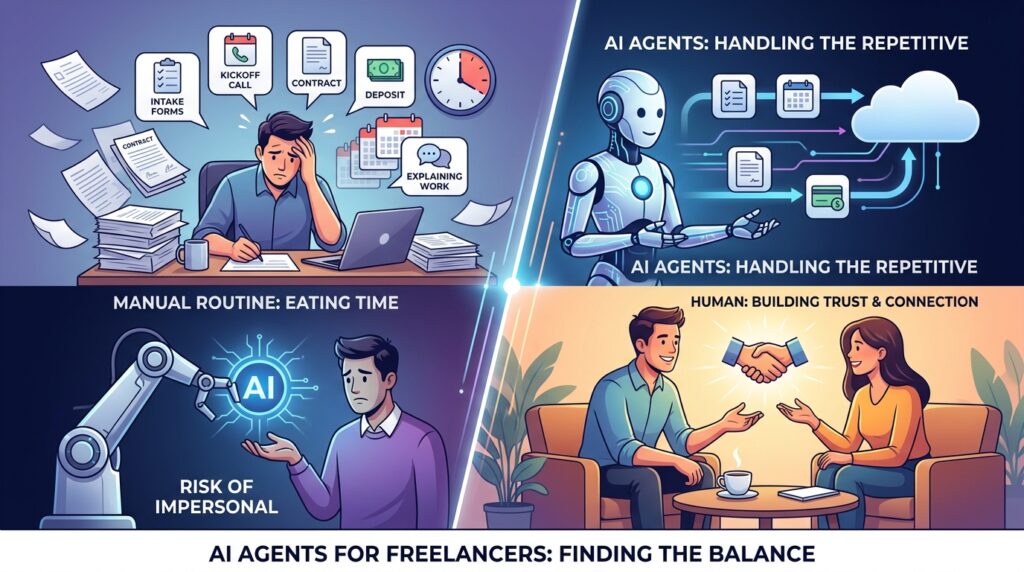
This is exactly where AI agents for freelancers earn their place. Used well, they handle the repetitive, predictable parts of onboarding — while you stay fully present for the parts that actually build trust: the first real conversation, the tailored recommendation, the moment a client feels genuinely understood.
This guide walks through how to build that balance step by step, so automation saves you time without making your business feel impersonal.
What Are AI Agents for Freelancers?
AI agents for freelancers are tools that go beyond simple automation — instead of just moving data from one app to another, they can read incoming information, make basic decisions, and take multi-step actions on your behalf. An intake form response might trigger an agent to check your calendar, send a scheduling link, and draft (not necessarily send) a personalized welcome message, all without you manually touching each step.

This is different from a single automation like “when form is submitted, send an email.” An agent can combine several of those steps, adapt based on what a client entered, and hand off to you at exactly the point where human judgment matters most.
According to McKinsey’s most recent State of AI research, roughly 62% of organizations are now experimenting with AI agents in some part of their operations — a sign this shift isn’t limited to large companies, and freelancers have a real opportunity to apply the same approach at a much smaller, more personal scale. You can read the full findings in McKinsey’s research on AI agent adoption.
Step-by-Step Guide: Automating Onboarding With AI Agents
Step 1: Map Your Current Onboarding Process First
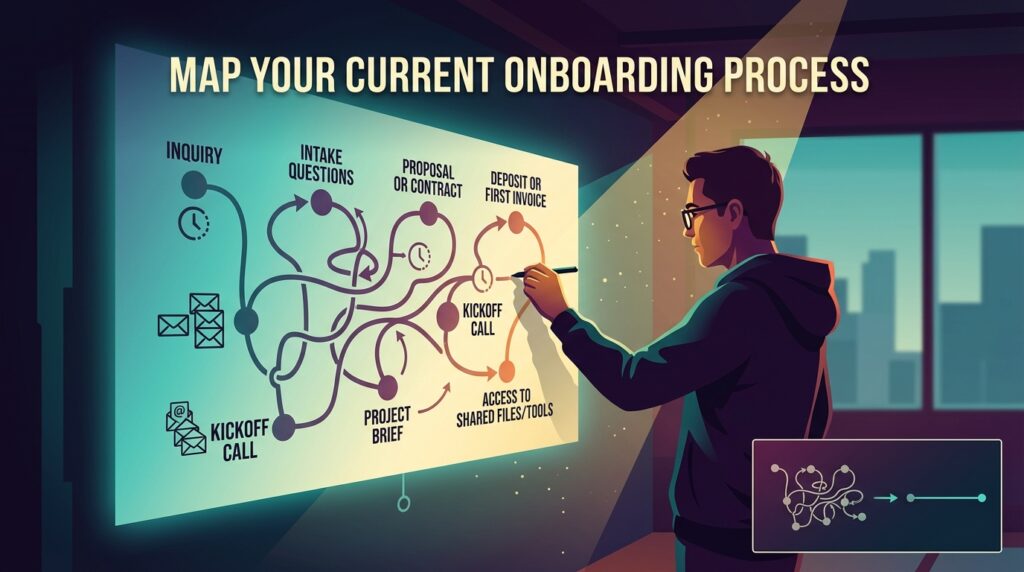
What to do: Before adding any tool, write out every single step your onboarding process currently involves, from first inquiry to first invoice paid.
How to do it: List each stage: initial inquiry, intake questions, proposal or contract, deposit or first invoice, kickoff call, project brief, and access to shared files or tools. Note roughly how long each step takes and how often you repeat the same message or question.
Why it matters: You can’t automate a process you haven’t actually mapped. Jumping straight to tools often means automating a messy process instead of fixing it first.
Example: A freelance web developer might discover they’ve manually typed nearly the same “here’s what I need from you to get started” email to the last 15 clients — a clear candidate for automation.
Step 2: Separate Repetitive Steps From Personal Touchpoints

What to do: Go through your mapped process and label each step as either “repetitive” (same every time, low emotional weight) or “personal” (where the client needs to feel heard, reassured, or specifically understood).
How to do it: Repetitive steps usually include: sending intake forms, scheduling links, standard contract templates, and invoice reminders. Personal steps usually include: the first real conversation, answering specific project questions, and any moment where a client is nervous or uncertain about the process.
Why it matters: This is the core decision that determines whether automation helps or hurts. AI agents for freelancers work best on the repetitive list — trying to automate the personal list is exactly what makes a client relationship feel cold.
Example: A freelance copywriter might automate the scheduling link and intake form completely, but always personally record (or write) the welcome message, even if an AI agent drafts a first version for them to edit.
Step 3: Build an Automated Intake and Scheduling Flow
What to do: Set up a form-based intake process that automatically routes into scheduling, without manual back-and-forth emails.
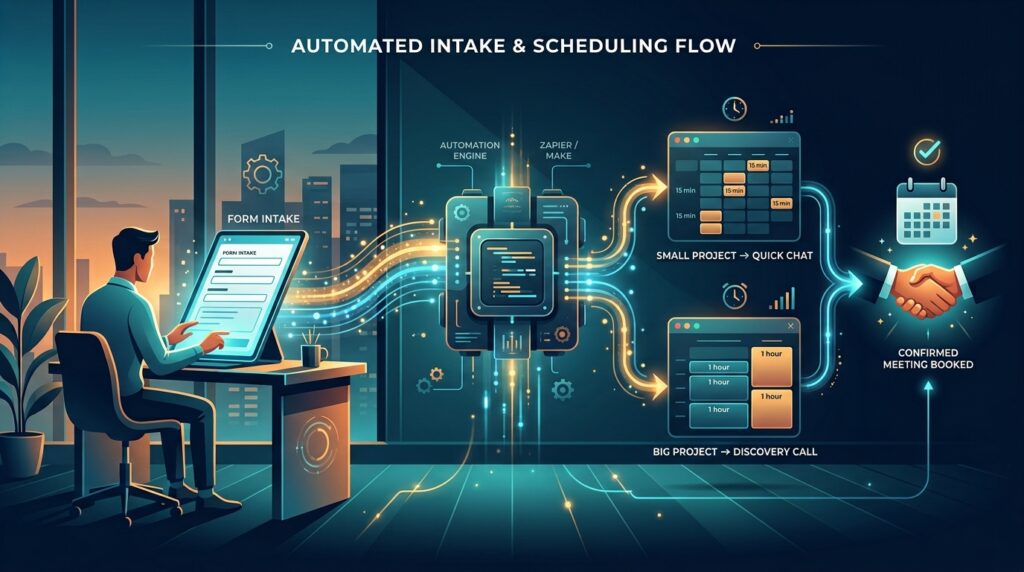
How to do it: Use a form tool (Tally, Typeform, or a Notion form) connected to a scheduling tool (Calendly or similar) through an automation platform like Zapier or Make. When a lead submits the form, they’re automatically shown available times based on the details they entered — for example, routing bigger projects to a longer discovery call and smaller ones to a quick 15-minute chat.
Why it matters: This removes one of the most common friction points — the multi-email scheduling dance — and is often the easiest first win for freelancers testing AI agents for freelancers for the first time, since it gives clients a sense of structure and professionalism from their very first interaction with you.
Step 4: Let an AI Agent Draft (Not Send) Personalized Follow-Ups
What to do: Use an AI agent to generate a first draft of your welcome message or project brief based on what the client entered in their intake form, then review and personalize it before sending.
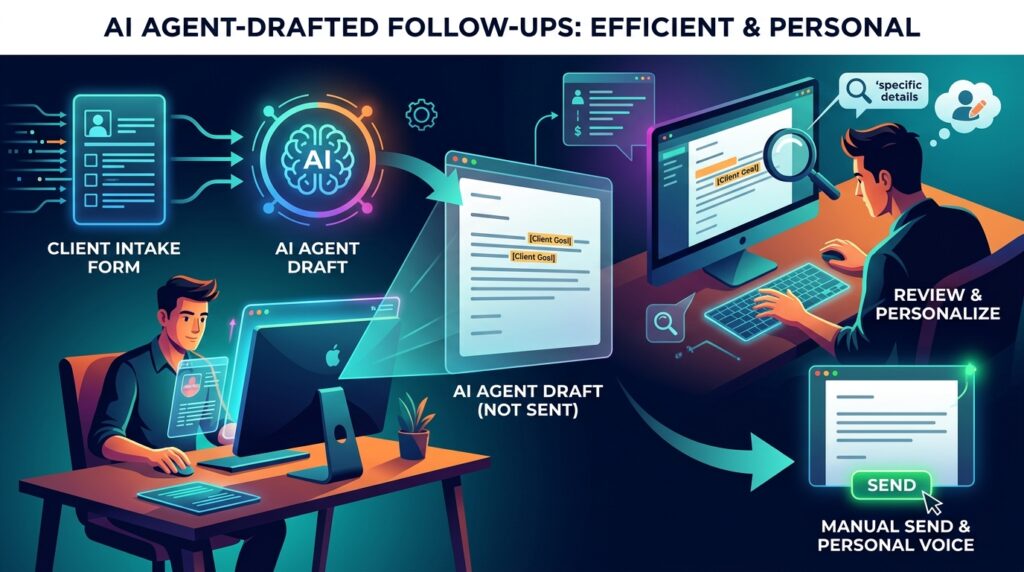
How to do it: Many onboarding automation platforms now include built-in AI drafting, or you can connect your form data to a tool like ChatGPT or Claude via an automation platform, prompting it with the client’s specific answers to produce a tailored first draft.
Why it matters: This is where AI agents for freelancers genuinely save time without sacrificing warmth — the agent handles the blank-page problem, while you still add the specific, human details a template alone would miss.
Example: Instead of sending a generic “welcome aboard” email, an agent-drafted message can reference the client’s actual stated goal from their intake form, which you then adjust in your own voice before hitting send.
Step 5: Automate Contracts, Deposits, and Invoicing
What to do: Set up automated contract generation and invoice requests tied to your intake or proposal approval step.
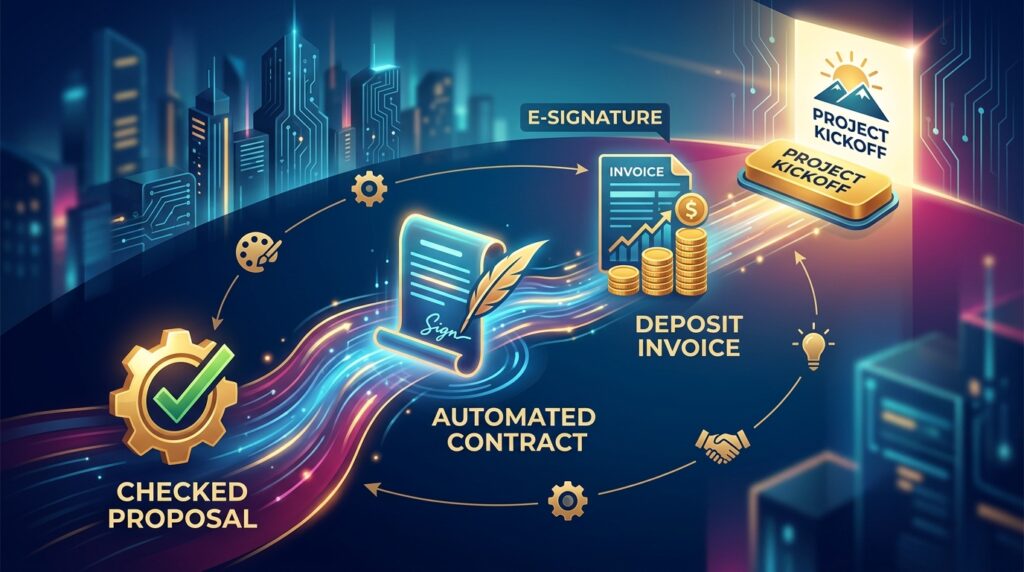
How to do it: Platforms like HoneyBook, Dubsado, or Bonsai let you build a workflow where an approved proposal automatically triggers a contract for e-signature, followed by a deposit invoice, without you manually creating each document.
Why it matters: These documents rarely need customization beyond project-specific details, making them ideal candidates for full automation. Chasing signatures and payments manually is exactly the kind of repetitive admin work automation is built for.
Example: A freelance designer using an automated contract-and-deposit flow might go from “proposal accepted” to “deposit paid and kickoff call booked” without sending a single manual email.
Step 6: Keep the Kickoff Call and Key Decisions Human
What to do: Protect your actual kickoff conversation and any project-shaping decisions from automation entirely.

How to do it: Use the time you saved in Steps 3–5 to prepare more thoroughly for the kickoff call itself — review the client’s intake answers beforehand so the conversation feels informed rather than generic.
Why it matters: This is the step that separates efficient freelancers from ones who feel automated-out. Clients remember how a real conversation felt, not how quickly a form was processed.
Step 7: Test the Full Flow With a Real Client and Refine
What to do: Run your automated onboarding sequence with an actual new client before considering it finished.
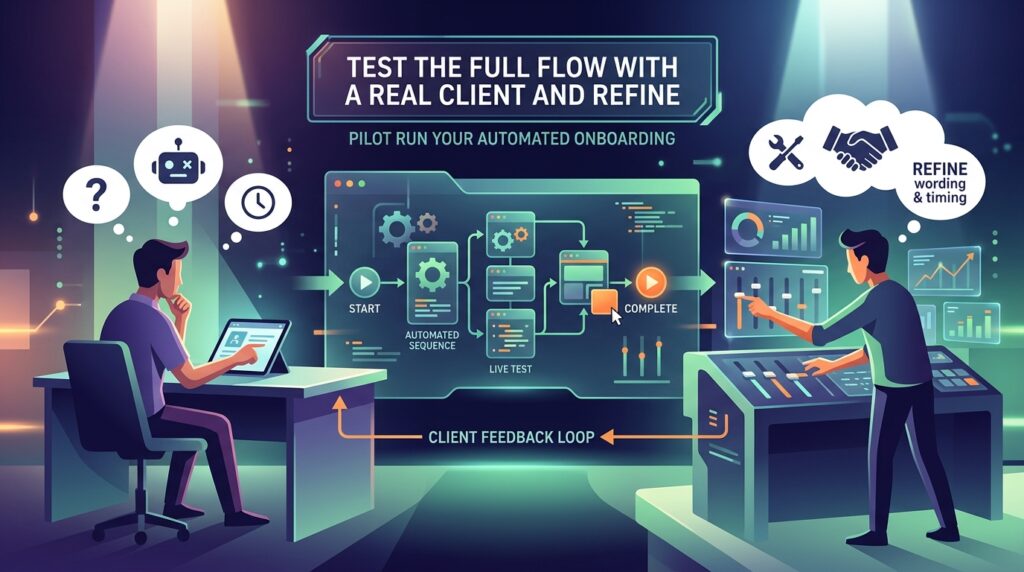
How to do it: After the first live run, ask the client directly (or simply notice) whether anything felt confusing, robotic, or delayed. Adjust wording, timing, or which steps stay automated based on that real feedback.
Why it matters: No onboarding automation works perfectly on the first try. A short pilot run with a real client surfaces problems a test submission never would. If you’re setting this up alongside other systems, it’s worth reviewing our broader workflow automation guides for freelancers to keep your onboarding process connected to the rest of your client management setup.
Common Mistakes to Avoid
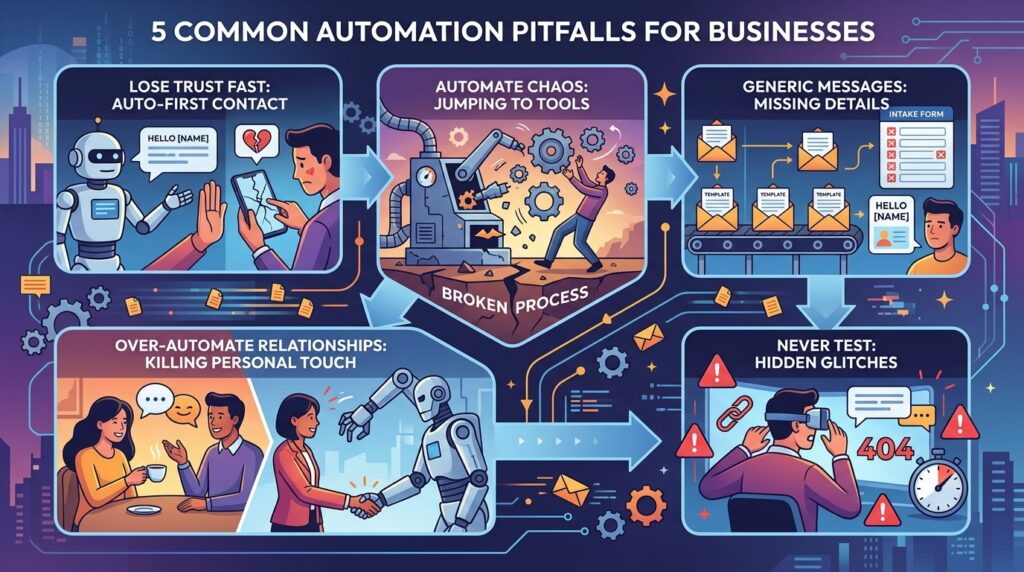
- Automating the first client conversation. Sending an AI-generated message as your literal first point of contact, without any human review, is the fastest way to lose trust before work even begins.
- Skipping Step 1 and jumping straight to tools. Automating a broken or inconsistent process just makes the inconsistency happen faster.
- Using generic templates with no personalization fields. If your intake form doesn’t capture specific client details, your automated messages will read as obviously generic.
- Over-automating small, relationship-driven freelance practices. If you serve a handful of high-touch clients rather than a high volume of similar ones, heavy automation may cost more in relationship quality than it saves in time.
- Never testing the client-facing experience yourself. Submit your own intake form and go through the full flow periodically to catch broken links, awkward phrasing, or delays.
Useful Tips for Beginners

- Start by automating just one step (like scheduling) before building a full multi-step flow — this makes problems easier to spot and fix.
- Keep a short human note field in your intake form so clients can add anything that doesn’t fit the structured questions.
- Review AI-drafted messages for tone, not just accuracy — a technically correct message can still sound cold if the phrasing is off.
- Set a recurring reminder to audit your onboarding flow every few months as your services or pricing change.
- If you work with clients across different regions, build in time zone confirmation as an explicit intake question rather than assuming.
Frequently Asked Questions
1. Do I need coding skills to set up AI agents for freelancers? No. Most tools mentioned here (Zapier, Make, Tally, HoneyBook, Dubsado) are no-code platforms built for exactly this kind of workflow, using visual builders rather than programming.
2. Will automating onboarding make my business feel less personal? It depends entirely on which steps you automate. As covered in Step 2, automating repetitive admin tasks while keeping key conversations and decisions human is how freelancers avoid that trade-off.
3. Are AI agents for freelancers expensive to set up? Costs vary by tool and plan, and many platforms offer free tiers suitable for solo freelancers with a manageable client volume. Always check current pricing directly on each provider’s site, since plans and limits change over time.
4. Can AI agents completely replace manual client onboarding? Not realistically, and it’s not the goal. Even a well-automated flow still needs a human for the kickoff conversation, project-specific decisions, and unexpected client questions that don’t fit a template.
5. How do I know which onboarding steps are safe to automate? Use the repetitive-versus-personal test from Step 2: steps that are identical for every client and carry low emotional weight are generally safe to automate; anything involving reassurance, negotiation, or a client’s specific concerns should stay manual.
Final Thoughts

AI agents for freelancers aren’t about replacing the relationship-building side of client work — they’re about clearing away the repetitive admin that stands between a new client and a great first impression. Map your process, separate the repetitive from the personal, automate the former, and protect the latter.
Start small: automate just your scheduling and intake this week, run it with one real client, and build from there based on what actually feels smoother — for you and for them.