Best Free AI Image Generators Without Watermarks in 2026
Watermarks can ruin an otherwise great AI-generated visual — especially when you’re building a blog, a client project, or social media content that needs to look clean and professional. If you’ve been searching for AI image generators without watermarks, you’re not alone. As AI art tools have exploded in popularity, more creators, marketers, and small business owners are looking for platforms that let them generate high-quality images without a logo or branding stamped across the corner.
In this guide, we’ll break down the best AI image generators without watermarks available right now, what separates the free options from the paid ones, and how to pick the right tool depending on your use case — whether that’s blog thumbnails, product mockups, or social media graphics.
Why Watermarks Show Up on AI-Generated Images

Most free AI image tools add a watermark for one simple reason: it’s a business model. The company lets you generate images at no cost, but the watermark acts as both a subtle ad and a nudge toward the paid tier. Some platforms also add a small AI-disclosure mark (like Google’s SynthID or the C2PA content credential tag) to indicate the image was machine-generated — this is different from a branding watermark and usually can’t be removed, since it exists for transparency and authenticity reasons.
When people search for AI image generators without watermarks, they’re typically looking for one of two things: a free tool that doesn’t brand its output, or a paid subscription that unlocks clean exports. Below, we cover both.
Top AI Image Generators Without Watermarks
1. Adobe Firefly
Adobe Firefly is one of the most polished AI image generators without watermarks, especially if you’re already inside the Adobe ecosystem. The free tier includes a generous monthly credit allowance, and generated images come without any visible watermark. Firefly is trained on Adobe Stock and licensed content, which makes it a safer choice for commercial projects compared to tools trained on scraped web data.
Best for: Marketers and designers who need commercially safe images and already use Adobe Creative Cloud.
2. Leonardo AI
Leonardo AI offers a free daily token allowance, and unlike many competitors, the standard output doesn’t carry a visible watermark. It’s particularly strong for stylized, game-art, and concept-art-style visuals, but it handles product and lifestyle imagery well too. Upgrading to a paid plan increases your generation limits and unlocks higher resolutions.
Best for: Creators who want stylistic variety without paying immediately.
3. Ideogram

Ideogram has become a favorite among content creators because it handles text-in-image generation unusually well — think posters, quote graphics, or thumbnails with embedded text. Its free plan does not stamp a visible watermark on standard-resolution downloads, making it one of the more accessible AI image generators without watermarks for bloggers.
Best for: Pinterest pins, blog featured images, and text-heavy graphics.
4. Playground AI
Playground AI gives users a solid number of free daily generations with clean, watermark-free exports at standard resolution. The interface is beginner-friendly, and it supports multiple underlying models, so you can experiment with different visual styles in one place.
Best for: Beginners who want an easy learning curve.
5. Microsoft Designer (powered by DALL·E)
Microsoft Designer, built on OpenAI’s image models, is completely free and does not watermark its output. It’s tightly integrated with Microsoft’s design templates, which makes it convenient for quickly turning a generated image into a finished social post or banner.
Best for: Quick social media graphics without any subscription cost.
6. Midjourney (Paid)
Midjourney doesn’t have a free tier anymore, but its paid plans produce some of the highest-quality AI art available, with zero watermarking at any subscription level. If image quality is your top priority and budget isn’t a major constraint, Midjourney remains a favorite among professional creators.
Best for: High-end commercial and artistic projects.
How to Choose the Right Tool for Your Needs
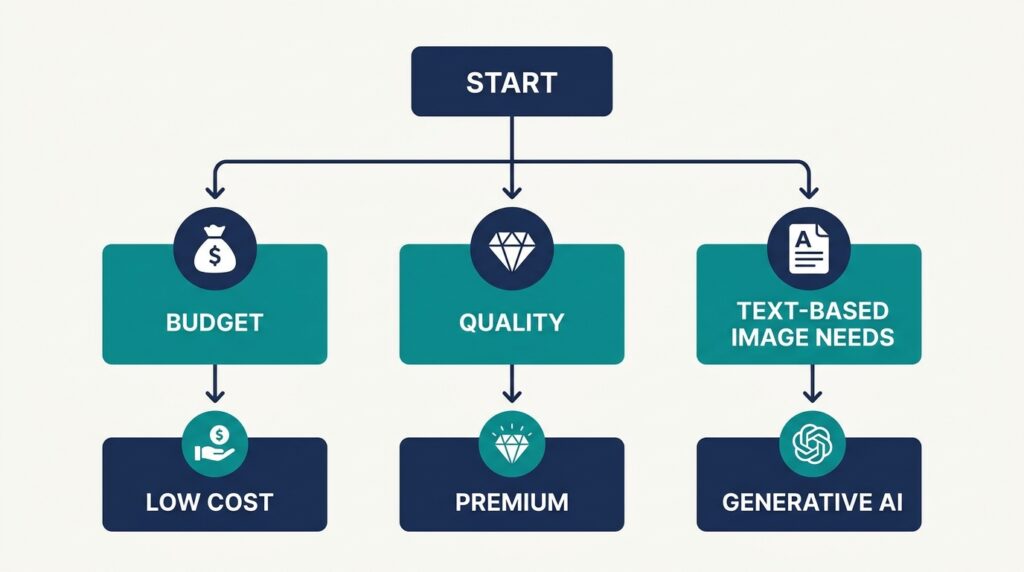
Not every option on this list of AI image generators without watermarks fits every use case. Here’s a quick way to decide:
- If you need commercial-safe images (for client work or monetized content), prioritize Adobe Firefly — its training data licensing reduces copyright risk.
- If budget is your main constraint, Microsoft Designer and Playground AI offer strong free tiers.
- If you need text baked into the image (quote cards, pins, posters), Ideogram is the clear winner.
- If quality matters more than cost, Midjourney remains the benchmark, even without a free option.
If you’re building out a content workflow — visuals, blog structure, and monetization together — it helps to have a repeatable system rather than picking tools ad hoc. On Digital Task Compass, we regularly break down how creators and small agencies build lean content pipelines using free and low-cost AI tools without sacrificing quality, which pairs well with the platform choices covered here.
A Word of Caution on “Watermark Removal” Tools
You may come across third-party apps and browser extensions that claim to strip watermarks off AI images generated by other platforms. We’d recommend avoiding these. In most cases, the watermark exists because the image was generated under a free-tier license or contains a provenance/authenticity tag — removing it can violate the platform’s terms of service or misrepresent the image’s origin. The safer and more sustainable path is simply choosing one of the AI image generators without watermarks listed above from the start, rather than trying to strip a mark after the fact.
Best Practice Workflow

For most bloggers and small business owners, the most efficient solution is this: pick one free-tier tool without a watermark (Ideogram or Playground AI are great starting points), use it consistently so you learn its prompt patterns, and upgrade to a paid plan like Firefly or Midjourney only once your content volume or commercial needs justify it. This avoids the temptation to hunt for watermark-removal shortcuts and keeps your visuals fully compliant for commercial use.
If you want to keep up with how these platforms evolve — free-tier limits, licensing terms, and new model releases — Search Engine Journal regularly covers AI image tool updates and is worth bookmarking.
Final Thoughts
Finding reliable AI image generators without watermarks doesn’t require chasing sketchy removal hacks — it just means knowing which platforms already offer clean exports on their free or paid tiers. Adobe Firefly, Leonardo AI, Ideogram, Playground AI, Microsoft Designer, and Midjourney each serve slightly different needs, so pick based on your budget, style preference, and whether commercial safety matters for your project.